
Call Us

(905) 670-0113

How to Choose a Low Profile CPU Cooler?

Choosing a Low Profile CPU Cooler is not simply a matter of finding the shortest heatsink. It is a space, noise, and temperature decision. In a compact case, every millimeter matters. A cooler may fit beneath a 70 mm clearance limit yet still block memory, exhaust airflow, or a PCIe slot.

Industry research reflects this growing design pressure. Grand View Research identifies thermal management as an important factor in the expanding computer cooling market, while IDC’s small-form-factor PC analysis highlights demand for compact systems that deliver desktop-class performance. These reports do not guarantee that every Low Profile CPU Cooler will perform equally. They show why careful selection matters as processors become more power-dense.

Noctua product engineer Jakob Dellinger has described the challenge this way: “Low-profile cooling is always a compromise between available space, noise, and thermal performance.” That balance is easy to underestimate. A cooler with a dense fin stack may look impressive, but restricted airflow can turn it into a warm metal roof above the CPU. Fan speed, mounting pressure, case ventilation, and processor power limits all change the result.

Small details matter.

This guide will compare height, heat dissipation, socket compatibility, acoustic behavior, and real-world installation experience. It will also question a common assumption: the largest cooler is not always the best cooler. In a poorly ventilated mini-ITX case, a slightly weaker model with better airflow may produce steadier temperatures. Readers should verify manufacturer specifications, because case tolerances and motherboard layouts can differ by only a few millimeters.
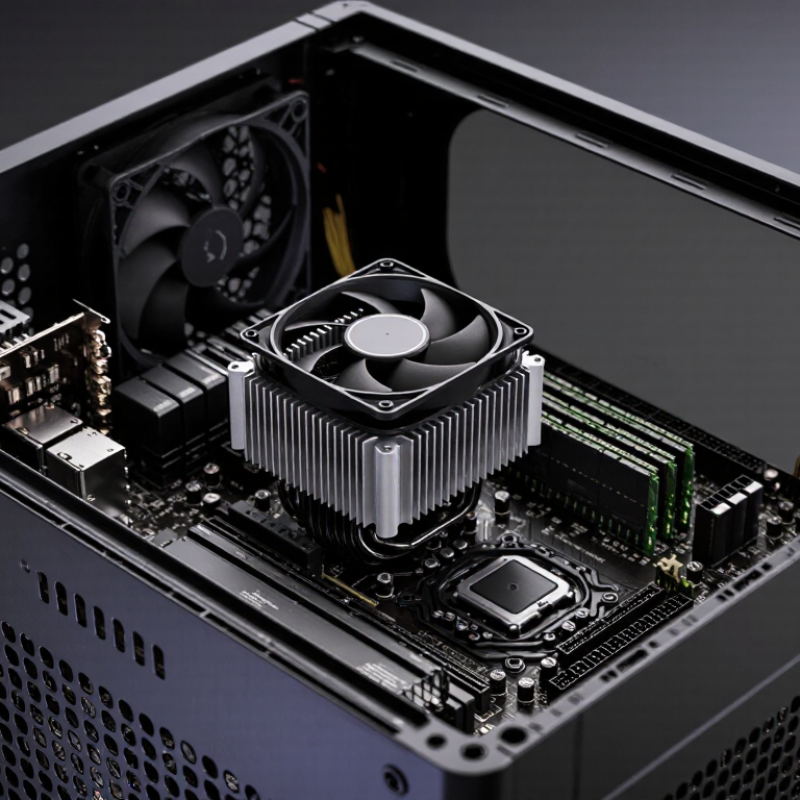
How to Choose a Low Profile CPU Cooler?

Define the Space, Performance, and Compatibility Requirements

How to Choose a Low Profile CPU Cooler?

Start by measuring the available space, not by guessing from product photos. Check your case’s maximum CPU cooler height and compare it with the cooler’s full dimensions. Include the fan, mounting clips, and any side-panel bulge. Measure twice. Clearance matters. Also inspect nearby memory slots, motherboard heatsinks, and the graphics card. A cooler may fit the socket but still block tall memory or restrict airflow.

Performance depends on more than the advertised thermal rating. A processor’s real power draw can exceed its basic specification during sustained rendering or gaming. Look for test results using similar workloads, room temperatures, and fan speeds. A low profile cooler with a larger fin stack often handles heat better, but it may produce more noise in a narrow case. Case airflow matters too. One intake fan and one exhaust fan can change temperatures noticeably.

Compatibility needs careful checking. Confirm the socket, mounting hardware, motherboard layout, and memory clearance before buying. Follow the installation manual, especially when applying thermal paste and tightening screws evenly.

I once trusted a height measurement and ignored the side panel, creating unnecessary pressure during installation. That was avoidable.

Leave room for maintenance, dust cleaning, and future component changes. Specifications help, but physical measurements and reliable independent testing reveal the practical limits.

Compare Cooler Dimensions with Case and Motherboard Clearances

Choosing a low-profile CPU cooler begins with measurements, not appearance. Measure the case’s maximum CPU cooler height from the motherboard surface to the side panel. Leave a few millimeters of spare space. Manufacturing tolerances and panel flex can make a perfect fit uncomfortable.

Compare the cooler’s full dimensions with the motherboard layout. Check its width, length, and mounting position around the CPU socket. Large memory modules may sit beneath the fan edge. Tall voltage-regulator heatsinks can also block the cooler’s airflow path. The first PCIe slot deserves attention too. A wide cooler base may extend over it. Use the motherboard manual and the case’s technical drawing when possible. Do not rely on photographs.

I once trusted a listed height and overlooked the side-panel bulge. The cooler technically fitted, but installation became awkward and airflow was weaker than expected. That mistake changed my checking routine. I now place a paper template over the socket area before buying. Mark the RAM slots, socket center, rear I/O shield, and nearby expansion slot. Then compare those marks with the cooler’s footprint. Check fan orientation as well. Some models allow limited adjustment, but not all. Measure the installed memory height, including decorative covers. A cooler that clears standard modules may not clear taller ones. Small details matter here. Recheck every measurement before ordering.

How to Choose a Low Profile CPU Cooler?

Compare the cooler height with the case's maximum CPU cooler clearance. A practical fit should leave a small safety margin for manufacturing tolerances and installation space.

Evaluate CPU Cooling Capacity, Noise, and Fan Configuration

Choosing a low-profile CPU cooler starts with cooling capacity, not height alone. Match the cooler’s tested thermal capacity to the processor’s sustained power, then leave roughly 20% headroom for warm rooms and dust. Processor power can exceed its advertised thermal rating during boost workloads. That gap matters.

Noise needs a measurable reference. ISO 7779:2018 specifies controlled acoustic testing methods, while many product pages use inconsistent distances and room conditions. Prefer results measured at one metre, with ambient noise stated. A cooler producing 30 dBA in a quiet room may sound more noticeable than expected. Noise matters. I once focused on peak temperatures and ignored fan surges during short renders. That was a poor trade.

Fan configuration changes both airflow and acoustics. A single 120 mm fan often moves air effectively at lower rotational speed than a smaller fan, but chassis clearance decides whether that advantage survives. Check whether the fan pushes air through the fins or pulls it away. Use motherboard control settings to keep idle speeds low and raise them gradually near the processor’s thermal limit. ASHRAE’s 2021 Thermal Guidelines recommend controlling equipment conditions within defined temperature ranges, reinforcing the value of stable airflow rather than aggressive, constant fan speeds. The Uptime Institute’s 2024 Global Data Center Survey also identifies cooling efficiency as a continuing operational concern. For a compact case, record temperatures, fan speed, and noise during a 20-minute workload. Numbers reveal compromises that specifications hide.

Check Socket Support, RAM Clearance, and Installation Constraints

Choosing a low profile CPU cooler starts with socket support. Check the cooler’s official compatibility list against your motherboard and processor socket. Physical resemblance is not enough. Mounting holes, backplates, and retention brackets can differ between nearby sockets. I once trusted a similar-looking bracket and discovered it blocked the motherboard’s rear mounting plate. It was a poor assumption.

RAM clearance deserves equal attention. Measure the memory module height, not just the cooler’s advertised dimensions. Tall heat spreaders may touch the fan or fins, especially when the cooler is installed across the memory slots. Check whether the fan can slide sideways. Even a few millimeters can determine whether the case closes properly. Also measure the case’s maximum cooler height, including the fan and mounting hardware.

Tips: Print the motherboard layout before installation. Mark the socket, memory slots, and nearby heatsinks. Test-fit the cooler without thermal paste first. Tighten screws gradually in a cross pattern, and stop if the board begins to flex. Leave room for a screwdriver. That small detail is easy to miss.

Installation constraints can change your choice. A cramped case may require removing the power supply or motherboard first. Confirm airflow direction and cable clearance before tightening everything. Cooler specifications are useful, but real builds can vary because sockets, boards, and cases have small dimensional differences. Measure twice. Then check the manual again.

Select the Best Cooler Based on Budget and Long-Term Reliability

How to Choose a Low Profile CPU Cooler?

A low profile cooler should match your budget, processor heat output, and case clearance. Measure twice. A few millimeters can decide whether the side panel closes properly. Check the cooler height, socket support, memory clearance, and mounting hardware before ordering. In my compact builds, a slightly taller heatsink often reduced fan noise more effectively than an expensive, ultra-thin model. That trade-off is easy to miss.

Budget models can work well for office systems, media boxes, and processors with moderate power limits. Look for solid mounting pressure, a dense metal fin stack, and a replaceable fan. Fan bearings matter over time, especially when the computer runs daily in a warm room. Cheap fans may become noisy after months of dust exposure. Noise matters. A quiet cooler can improve real-world comfort more than a small temperature advantage.

For demanding workloads, spend more on cooling capacity and long-term serviceability rather than appearance. I test compact coolers with repeated rendering sessions, checking temperatures after the system reaches a stable heat level. However, my measurements are not universal; airflow, room temperature, and motherboard settings change the result. That limitation deserves attention. Clean the fins periodically, avoid excessive mounting force, and confirm that replacement parts remain available. A reliable cooler should protect performance without requiring constant adjustment. Check the warranty terms carefully. A low purchase price is less attractive when failure means replacing the entire cooling assembly.